> ## Documentation Index
> Fetch the complete documentation index at: https://docs.fabi.ai/llms.txt
> Use this file to discover all available pages before exploring further.
# AI Tips
> Quick tips to get the most out of Fabi's AI data analyst and conversational BI features.
A large part of unlocking massive productivity gains with Fabi.ai is leveraging the AI. Here are a few quick tips to make sure you get the most out of our AI.
# Tagging elements
The AI will know what code or cell you're talking about based on what you've been working on and what code you're currently looking at, but sometimes you want to be more specific. You can tag elements and cells in this situation.
> Update `@orders_analysis` to only consider data from the past 30 days
 To get the most ouf of the tagging functionality, consider renaming your cells to make it easier to track.
# Mentioning DataFrames
The AI will do a remarkable job at figuring out what data you're referring to, but sometimes when you're doing long, complex exploratory data analysis, you may have a lot of variables and dataframes that look similar. In that case, you can tell the AI which dataframe to use specifically.
> Please use `companies_cleaned` to calculate the average employee count per company
# Auto-accept vs Manual Mode
When you ask the Fabi Analyst Agent a question, if it produces code and an output, you'll have the option of adding the code block to the Smartbook to save it.
You can choose if you want to manually or automatically accept AI suggestions.
To get the most ouf of the tagging functionality, consider renaming your cells to make it easier to track.
# Mentioning DataFrames
The AI will do a remarkable job at figuring out what data you're referring to, but sometimes when you're doing long, complex exploratory data analysis, you may have a lot of variables and dataframes that look similar. In that case, you can tell the AI which dataframe to use specifically.
> Please use `companies_cleaned` to calculate the average employee count per company
# Auto-accept vs Manual Mode
When you ask the Fabi Analyst Agent a question, if it produces code and an output, you'll have the option of adding the code block to the Smartbook to save it.
You can choose if you want to manually or automatically accept AI suggestions.
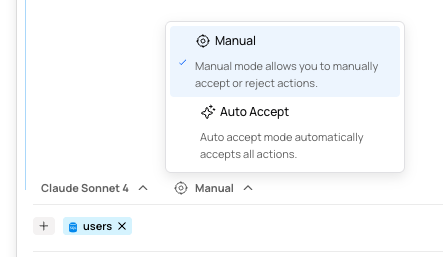 Note that has a safety net, you'll always be able to revert any changes made by the AI. Whether you're in auto-accept or manual mode, whenever the AI applies changes to the Smartbook, a `Revert` button will appear in the chat history at the point where the suggestion was accepted. Clicking that button will revert the Smartbook back to the state it was in prior to the AI changes.
 # Starting a new thread
Sometimes in the middle of an analysis, it's good to start with a blank slate when you want to reset or approach a new topic.
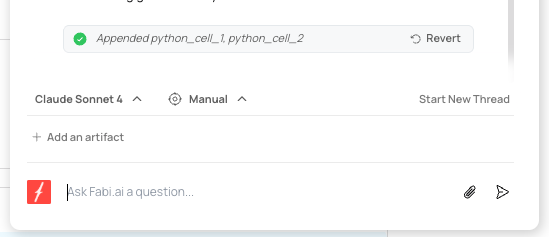
By selecting `Start New Thread`, you can archive your existing conversation, and remove the previous prompts and output from the Analyst Agent's memory.
# Starting a new thread
Sometimes in the middle of an analysis, it's good to start with a blank slate when you want to reset or approach a new topic.
By selecting `Start New Thread`, you can archive your existing conversation, and remove the previous prompts and output from the Analyst Agent's memory.
 # Selecting your AI model
Fabi offers access to all the best LLM models on the market. The list is continuously updated as new models are released, and you can generally expect the latest models from OpenAI, Anthropic and Google Gemini.
# Selecting your AI model
Fabi offers access to all the best LLM models on the market. The list is continuously updated as new models are released, and you can generally expect the latest models from OpenAI, Anthropic and Google Gemini.
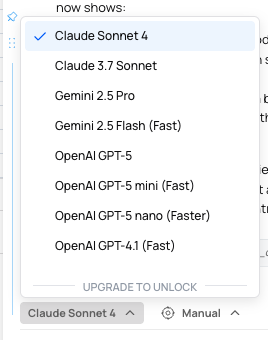 Organizations on our Enterprise plan have the option of limiting the model selection to only providers pre-approved by their organization. For more information, contact [sales@fabi.ai](mailto:sales@fabi.ai).