> ## Documentation Index
> Fetch the complete documentation index at: https://docs.fabi.ai/llms.txt
> Use this file to discover all available pages before exploring further.
# Publishing Dashboards & data apps
> Build and publish business intelligence dashboards with Fabi's AI dashboard builder. Share KPI dashboards, sales dashboards, and more in minutes.
# Building Dashboards & data apps
Once you’ve found the insights you’d like to share and added filters and inputs, it’s time to package this up into a polished **business intelligence dashboard** and share it with your stakeholders. Whether you’re building a KPI dashboard, an analytics dashboard for a specific team, or an executive overview, [Fabi’s AI dashboard builder](https://www.fabi.ai/) turns your analysis into a shareable dashboard in minutes.
## Configuring your dashboard layout
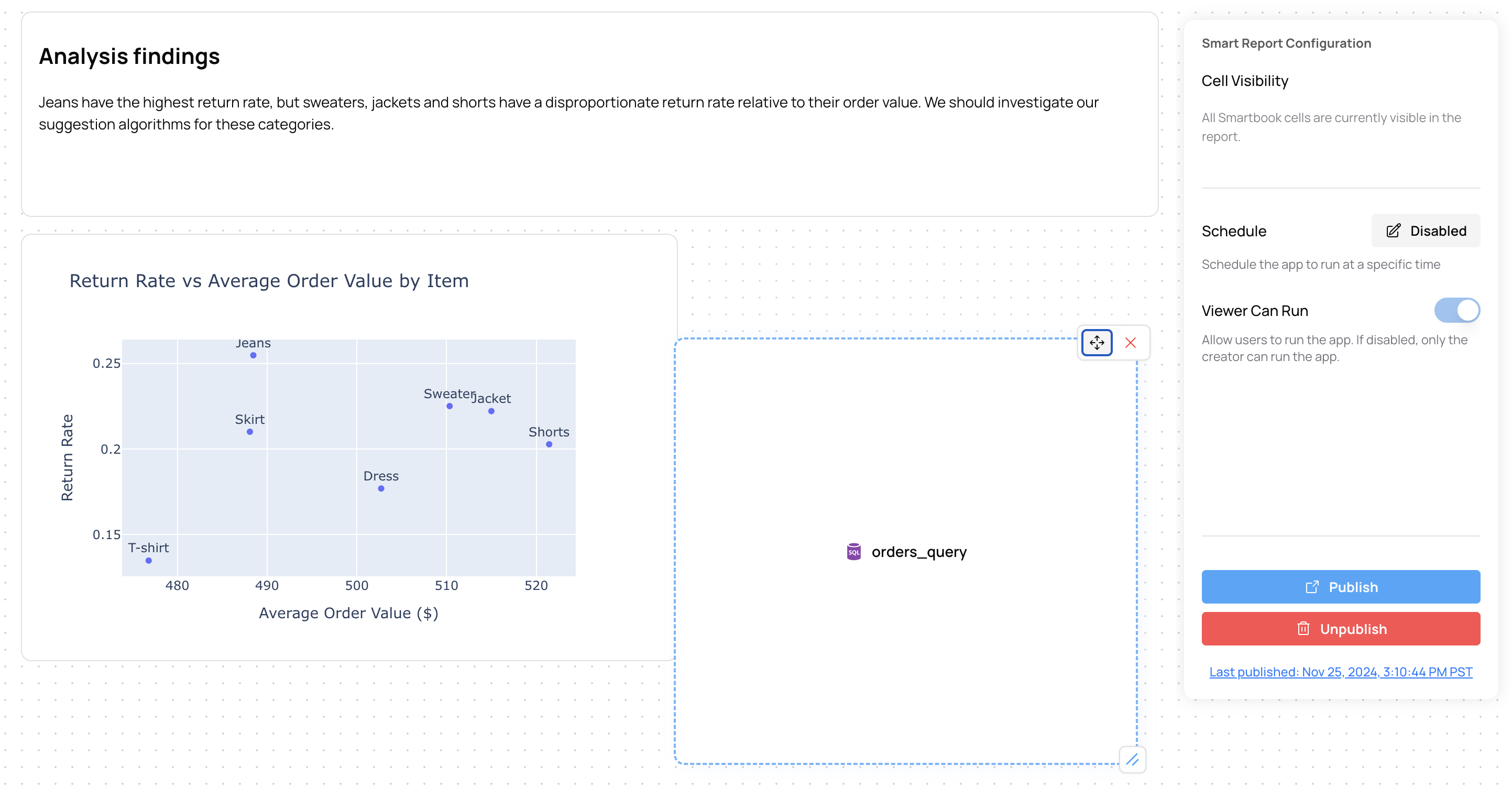
When publishing a dashboard based on your analysis, you likely want to change the layout a bit to tell a better story. To building your dashboard by clicking **Report** on the top menu bar from your Smartbook:
 In this view, you can do a few things:
1. Select which elements you would like to display in your published dashboard
2. Re-order and resize elements
3. Schedule your dashboard to run on a given cadence
**Important**: The order of the cells in the Smartbook matters, but in the dashboard, you can reorder cells however you want. [Fabi.ai](https://www.fabi.ai/) tracks dependencies between cells, which gives you the freedom to craft your dashboard in whichever way will resonate the most with your stakeholders.
In this view, you can do a few things:
1. Select which elements you would like to display in your published dashboard
2. Re-order and resize elements
3. Schedule your dashboard to run on a given cadence
**Important**: The order of the cells in the Smartbook matters, but in the dashboard, you can reorder cells however you want. [Fabi.ai](https://www.fabi.ai/) tracks dependencies between cells, which gives you the freedom to craft your dashboard in whichever way will resonate the most with your stakeholders.
 ## Publishing & sharing a dashboard
When your dashboard is ready to be published, click **Publish** and [Fabi.ai](https://www.fabi.ai/) will open up a new tab with your published dashboard.
## Publishing & sharing a dashboard
When your dashboard is ready to be published, click **Publish** and [Fabi.ai](https://www.fabi.ai/) will open up a new tab with your published dashboard.
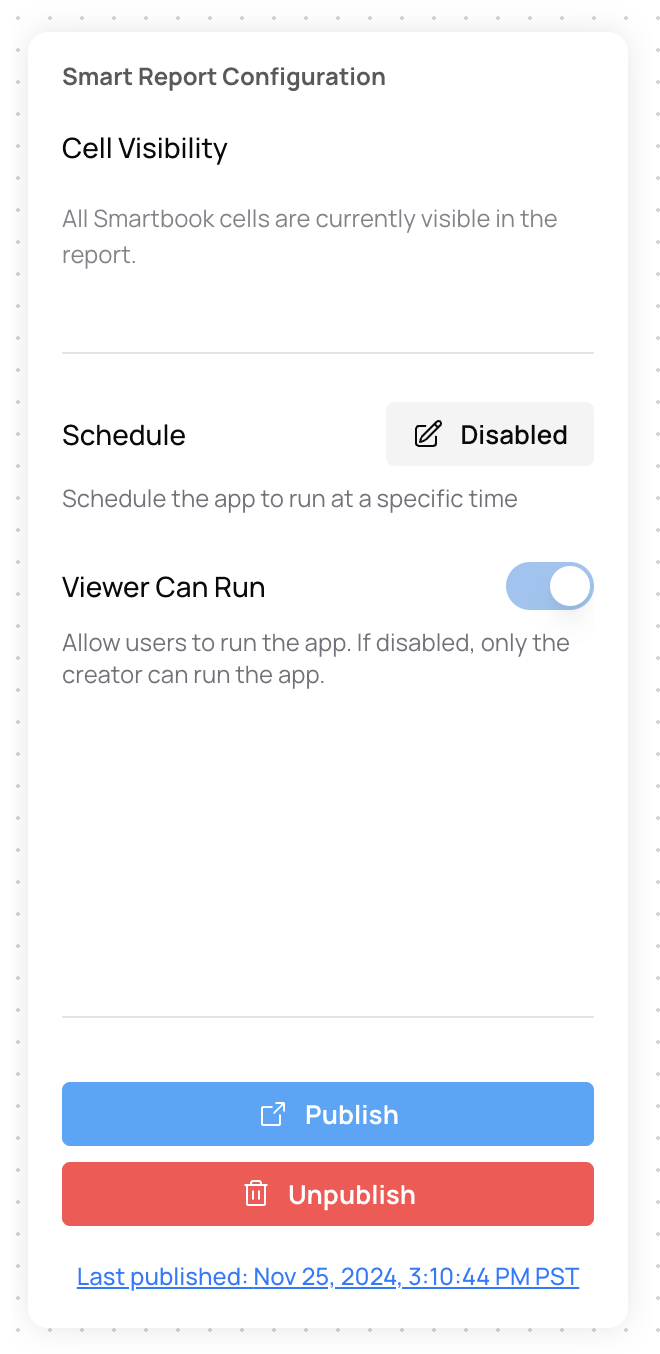 To share this dashboard, copy/paste the URL and share it with your colleagues, or if they're already [Fabi.ai](https://www.fabi.ai/) users, tag them in a comment.
## Scheduling dashboards
If you would like to schedule this Dashboard & data app to refresh on a specific cadence, in the Publish view, click "Disabled" next to Schedule in the right hand panel.
Select the time and cadence at which you would like to refresh the data and hit Submit.
For more information on how to schedule updates, check out [this](https://docs.fabi.ai/analysis_and_reporting/schedule_reports_and_workflows) page.
# Dashboards & data apps FAQ
Yes! Once you've published a dashboard, simply share the URL with anyone in your organization.
Yes, during the configuration step, [you can choose how frequently you want to refresh your data](/analysis_and_reporting/schedule_reports_and_workflows).
Analyst Agent will automatically be embedded in your dashboards to help you handle follow-up requests from your stakeholders. You can configure the data artifacts that you want to make available to [Analyst Agent](/analysis_and_reporting/analyst_agent).
Almost any kind. Fabi is used to build KPI dashboards, sales dashboards, marketing dashboards, CRM dashboards, analytics dashboards, and more. Because you can connect any data source and use AI to analyze it, you can build a business intelligence dashboard for virtually any team or use case.
Part of the beauty of Dashboards & data apps is that you can fully customize the layout of your dashboards regardless of execution order. We use a sophisticated dependency tracker to maintain proper and optimal execution. This is also why Fabi.ai provides world-class latency in dashboards.
To share this dashboard, copy/paste the URL and share it with your colleagues, or if they're already [Fabi.ai](https://www.fabi.ai/) users, tag them in a comment.
## Scheduling dashboards
If you would like to schedule this Dashboard & data app to refresh on a specific cadence, in the Publish view, click "Disabled" next to Schedule in the right hand panel.
Select the time and cadence at which you would like to refresh the data and hit Submit.
For more information on how to schedule updates, check out [this](https://docs.fabi.ai/analysis_and_reporting/schedule_reports_and_workflows) page.
# Dashboards & data apps FAQ
Yes! Once you've published a dashboard, simply share the URL with anyone in your organization.
Yes, during the configuration step, [you can choose how frequently you want to refresh your data](/analysis_and_reporting/schedule_reports_and_workflows).
Analyst Agent will automatically be embedded in your dashboards to help you handle follow-up requests from your stakeholders. You can configure the data artifacts that you want to make available to [Analyst Agent](/analysis_and_reporting/analyst_agent).
Almost any kind. Fabi is used to build KPI dashboards, sales dashboards, marketing dashboards, CRM dashboards, analytics dashboards, and more. Because you can connect any data source and use AI to analyze it, you can build a business intelligence dashboard for virtually any team or use case.
Part of the beauty of Dashboards & data apps is that you can fully customize the layout of your dashboards regardless of execution order. We use a sophisticated dependency tracker to maintain proper and optimal execution. This is also why Fabi.ai provides world-class latency in dashboards.